
How MeeShip Studio Works: From One Phone Photo to Catalogue Photos
TL;DR: Upload one phone photo of your product, pick a shoot (Single Shot, Studio Set or HD Shot), and MeeShip Studio builds the background, light and scene around it. You get 2 free trial credits to start, and credits are refunded automatically if a photo cannot be made.
What MeeShip Studio is
MeeShip Studio is a product photo tool for sellers of jewellery, festive decor, gifting items and puja articles. You give it one photo of your real product. It keeps the product and replaces everything around it: a clean white hero background, an ear or wrist for worn shots, a display stand, a festive silk-and-diya setup.
It exists for one reason. A listing with four good photos gets more clicks than a listing with one, but a photographer, a model and a light box are expensive when you have dozens of SKUs.
The five steps
- Take one phone photo. Soft window light, a plain surface, one product or one pair, and some space around it. Our jewellery photography guide covers this in detail.
- Sign in. You get 2 free trial credits.
- Choose your product type. Each type has its own scenes, because what looks right for earrings is different from what looks right for a diya.
- Pick a shoot and press the shutter. It usually takes about a minute, and the page shows live progress while you wait.
- Check and download. Compare every photo with the real product before you list it.
You can step through a real example below. These are results from ordinary phone photos.
Walk through MeeShip Studio
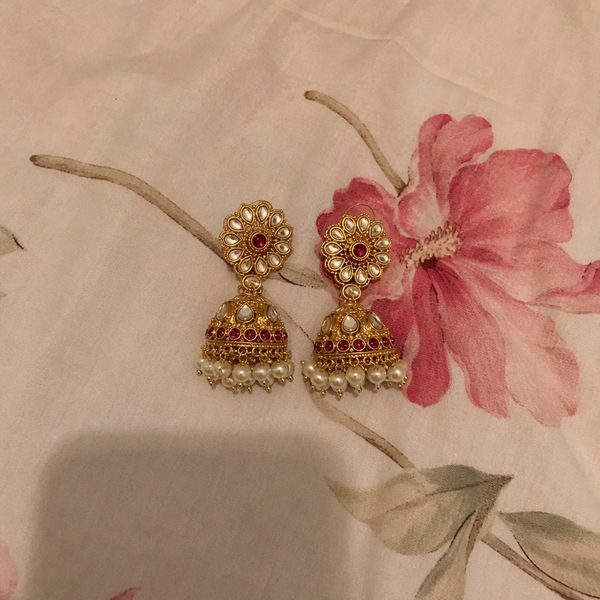
Ordinary phone photo, plain surface, daylight.
The three shoots
| Shoot | Credits | What you get | Use it for |
|---|---|---|---|
| Single Shot | 1 | One scene you pick, 1024 × 1024 px | Trying Studio, or filling one missing photo |
| Studio Set | 4 | Four scenes from one shoot, 1024 px each | A complete new listing |
| HD Shot | 3 | One scene you pick, 1536 × 1536 px | Your main image, or products with fine stone work |
These are alternatives, not a combined allowance. A credit balance can be spent on any of the three.
Scenes for each product type
| Product | Scenes |
|---|---|
| Earrings and jhumkas | White hero, worn on ear, display stand, festive |
| Necklaces and mangalsutra | White hero, on bust, on model, festive |
| Jewellery sets | White hero, bust with earrings, velvet box flat lay, festive |
| Bangles and bracelets | White hero, on wrist, bangle roll, festive |
| Keychains | White hero, in hand, lifestyle, gift box |
| Photo frames | White hero, on shelf, bedside, gift box |
| Diyas | White hero, lit diya, rangoli, festive |
| Idols | White hero, mandir, living room, festive |
| Puja items | White hero, mandir, festive, lifestyle |
What Studio does not promise
- It is not a guarantee of a perfect design match. Studio is instructed to keep every bead, stone, chain and colour as in your photo, and it usually does, but AI can slip on very fine details. Always compare with the real product.
- It cannot add detail your photo does not have. A blurry photo gives a blurry result, so a sharp starting photo matters.
- It is separate from the MeeShip image tool. Studio has its own credits, not shared with MeeShip image credits.
Credits, packs and refunds
New users get 2 free trial credits. Paid packs are one-time purchases with no subscription, and each pack has a validity period of 7 to 60 days. If a photo cannot be made, its credits are refunded automatically. For the full pack list and what expiry means, read MeeShip Studio credit packs and expiry, explained.
Ready to try it? Open MeeShip Studio and use your free credits on your best-selling product.
FAQs
- What do I need to use MeeShip Studio?
- One ordinary phone photo of your product and a MeeShip sign-in. You do not need a photographer, a model, lights or a light box.
- How many free credits do I get?
- New users get 2 free trial credits, enough for two Single Shots. Free trial credits are valid for a short period, so try them soon after you sign in.
- What is the difference between a Single Shot, a Studio Set and an HD Shot?
- A Single Shot (1 credit) makes one scene you pick at 1024 x 1024 px. A Studio Set (4 credits) makes four different scenes from one shoot. An HD Shot (3 credits) makes one scene you pick at 1536 x 1536 px with more detail.
- What happens if a photo cannot be made?
- The credits for that shoot are refunded automatically. If a photo changed your design, write to meeship.seller@gmail.com and the team will refund the credits.
Turn your phone photo into a studio shoot
Sign in to MeeShip Studio and get 2 free credits, enough for two Single Shots.
Open MeeShip StudioRelated reads
HD AI Jewellery Product Photos in India: What You Get, What It Costs, How to Check It
Jewellery sellers want studio-quality photos without a studio. Here is what HD AI photos can do with one phone picture, the real limits, what a shoot costs in credits, and how to check the result.
White Background Product Photo for Meesho, Amazon and Flipkart: How to Make One
The first image on a listing is usually a clean product photo on white. Here is how to take or make one with a phone, which size to aim for, and how to avoid the mistakes that get images rejected.
Diya, Idol and Puja Item Product Photos for the Festive Season: Phone Se Kaise Banayein
Festive buyers want to picture a diya lit at home or an idol in their mandir. Here are the four photos every puja listing needs, how to shoot brass and shiny items from your phone, and how to turn one photo into the rest.